
Discover remote AI agent developer jobs, essential skills, key responsibilities, and how to land a remote AI role.


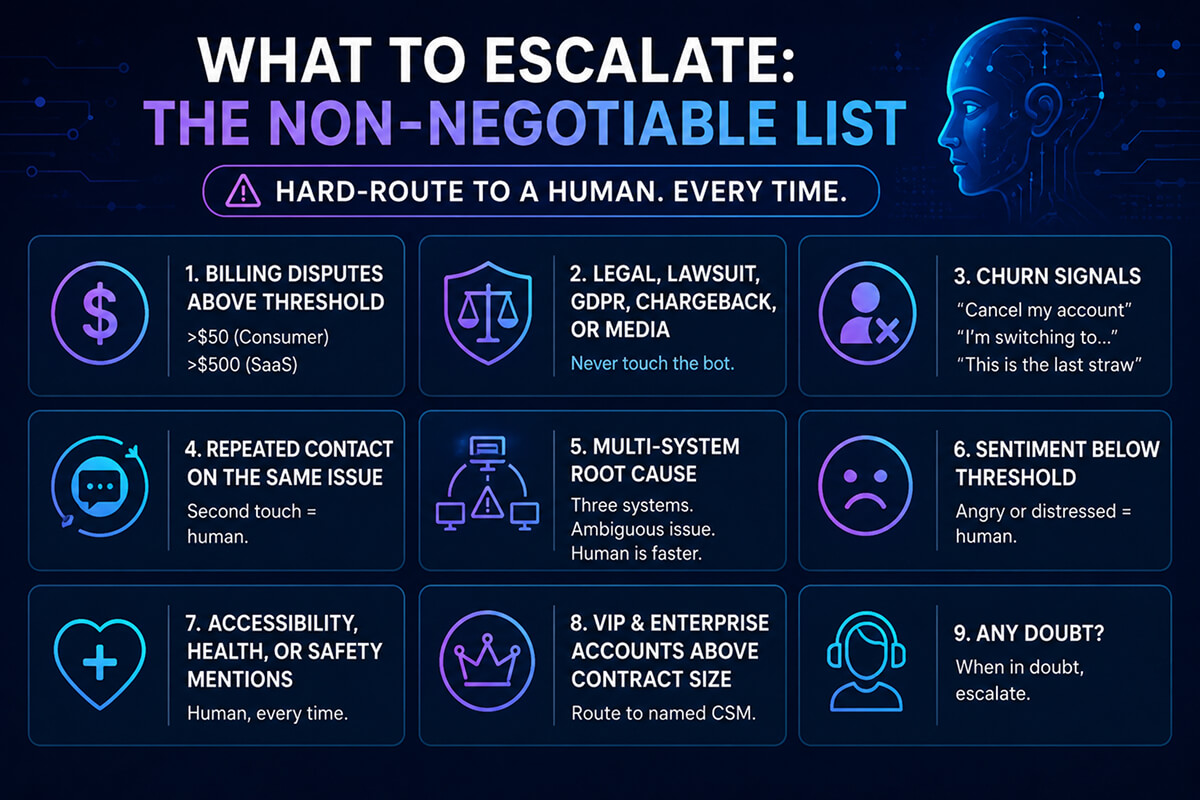
Automate the tickets where the answer already exists in your docs, your order database, or your account system-password resets, order status, refund eligibility checks, plan changes, shipping updates, basic troubleshooting. Escalate anything involving billing disputes over a dollar threshold, churn risk signals, legal or compliance language, multi-system root-cause investigation, or a customer who has asked the same question twice. Well-deployed AI customer support agents handle 45-70% of tier-1 volume in Zendesk or Intercom without touching CSAT, provided you wire the escalation triggers correctly from day one. The rest of this post is the playbook we use when retrofitting Claude agents into existing support stacks.
Table of Contents
Every incoming ticket should be scored on three axes before the agent decides to answer or hand off. Confidence is how sure the model is about the answer. Consequence is what happens if it gets it wrong. Context is whether the agent has the data it needs-order ID, account tier, recent activity-to give a real answer instead of a plausible one.
A useful shorthand: automate when confidence is high and consequence is low. Escalate when either drops below threshold. Most teams set the confidence floor at 0.8 for self-serve answers and 0.92 for any action that writes to a system (issuing a refund, canceling a subscription, changing an address).
This sounds obvious. It is not how most teams deploy. The common failure mode is routing everything to the bot and letting it answer at 0.4 confidence because no one set the threshold. That is the deployment that craters CSAT and ends up on Twitter.
The tickets below are where Claude agents earn their keep. They share three traits: the answer is deterministic, the data lives in a system the agent can query, and the customer’s emotional state is usually neutral.
A B2C client we worked with last quarter saw 62% deflection on this list alone within six weeks of going live in Intercom. Their human team’s average handle time dropped from 8.4 minutes to 5.1 because the tickets that reached them were genuinely harder.
These should hard-route to a human every time, regardless of how confident the model claims to be. The cost of getting them wrong is too high.
A bad handoff destroys the deflection gains. The customer explains their problem to the bot, the bot decides it’s out of scope, and then the human asks the customer to explain it again. CSAT tanks. Trust in the bot collapses. People learn to type “agent” as their first message.
Three things make a handoff work:
The integration pattern is similar across platforms. You sit a Claude-powered agent in front of the inbox, give it tool access to your internal systems through MCP servers or function calls, and define routing rules that decide which tickets it touches.
In Zendesk, the cleanest pattern is a sidebar app plus a triggered automation: the agent reads new tickets, generates a draft response, and either auto-sends (high confidence, low consequence) or surfaces the draft to a human for one-click send. In Intercom, the Fin-style inline takeover works well for chat, with the agent visibly handing off to a human when triggers fire.
Tool access matters more than prompt quality. An agent with read access to your order DB, billing system, and account state will outperform a more elaborate prompt with no data access. The mechanism that lets you control this cleanly is Anthropic’s tool use API-define each tool, set permissions per ticket type, and log every call for audit.
Claude Sonnet runs roughly $3 per million input tokens and $15 per million output tokens at current pricing. A typical support conversation runs 4-8K tokens. At 10,000 tickets a month with full RAG context, you’re looking at $400-900 in model costs. That’s trivial compared to a support headcount, but it can balloon if you don’t cap retrieval context or set token budgets per conversation. Set a hard ceiling per ticket and alert when daily spend exceeds 1.5x rolling average.
The vanity metric is deflection rate. The metric that matters is CSAT held constant or improved while deflection rises. Measure both, segmented by who answered the ticket.
| Metric | What it tells you | Target after 90 days |
|---|---|---|
| Deflection rate | % of tickets resolved without human | 45-65% |
| CSAT (bot-resolved) | Quality of automated answers | Within 5 points of human baseline |
| CSAT (escalated) | Whether handoffs hurt the customer | Equal to or higher than pre-bot CSAT |
| Repeat contact rate | Did the bot actually solve it | Below 12% |
| First response time | Speed gain from automation | Under 30 seconds for tier-1 |
| Cost per resolved ticket | Real economic impact | 30-50% reduction |
Survey bot-resolved tickets at the same rate you survey human-resolved ones. Do not let the bot opt itself out of measurement. If CSAT on bot conversations drops more than five points below the human baseline, narrow the automation scope until it recovers.
The teams that succeed roll out narrow and widen. The teams that fail try to automate everything in week one.
By day 120, most clients we work with are auto-sending on 8-12 intent categories, assisting on another 6-10, and escalating cleanly on everything else. The savings show up in handle time and headcount planning, not just deflection rate.
The automate-versus-escalate boundary is not static. As your agent accumulates resolved tickets, you get a labeled dataset of what it handled well and what it didn’t. Quarterly, review the categories sitting at the boundary-billing adjustments under $100, simple cancellation requests, second-touch follow-ups and decide whether to pull each one across the line.
The honest answer for most companies: about 70% of current tier-1 work can be safely automated within a year of disciplined deployment. The remaining 30% is where your support team actually adds value, and where you should be hiring for judgment rather than throughput.
AI Agents
Jul 3, 2026
Discover remote AI agent developer jobs, essential skills, key responsibilities, and how to land a remote AI role.

AI Agents
Jun 5, 2026
Learn how to develop AI agents using no-code tools, making AI accessible to non-coders.

AI Agents
Jun 1, 2026
Explore AI agent development in Python with frameworks and coding examples for intelligent agents.