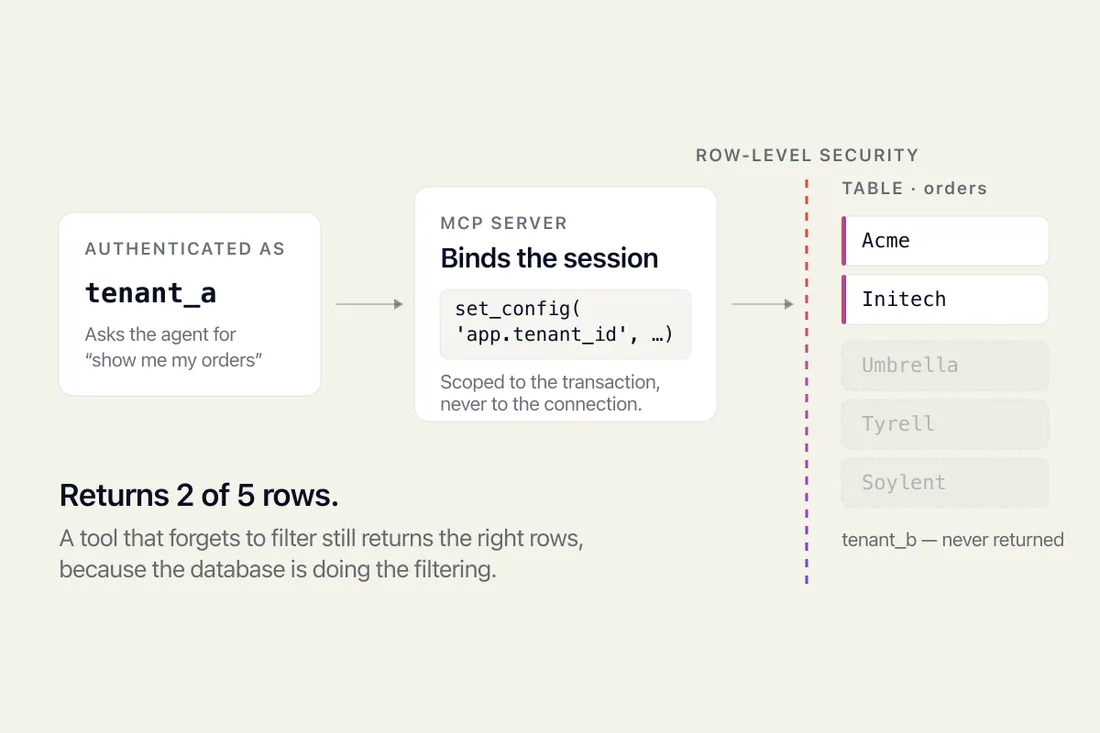
Give an AI agent your database and it sees every tenant's rows. How Postgres row-level security fixes that, and the two traps that silently disable it.

 Co-founder, PixlerLabJun 29, 2026

The Model Context Protocol (MCP) is an open standard, released by Anthropic in November 2024, that lets AI models like Claude connect to tools and data sources through a single uniform interface-instead of through custom code written separately for every integration. For a founder, that translates to a concrete change in economics: an AI MVP that used to need 6–10 weeks of custom connector work now often ships in 2–4. You stop paying engineers to rebuild the same Slack, Postgres, and Google Drive plumbing every project, and you start composing capabilities from a growing library of pre-built MCP servers. That is the whole pitch. The rest of this post is what it means in practice.
MCP is to AI agents what USB-C is to laptops. Before USB-C, every device had its own port and its own cable. Before MCP, every integration between an LLM and an external system-a database, a CRM, a file store, a code repo-was a bespoke piece of glue code. MCP defines a standard “port”: a small server speaks the protocol, exposes a set of tools and resources, and any MCP-compatible client (Claude Desktop, Claude Code, Cursor, your custom agent) can plug into it. The model discovers what the server can do, calls it, gets structured results back, and acts.
That is the entire mechanism. A protocol, a server, a client. The interesting part is what disappears once it exists.
Before MCP, a fairly modest agent-say, one that reads support tickets from Zendesk, looks up customer data in Postgres, and posts a summary to Slack-required three custom integration layers. Each had its own auth flow, its own error handling, its own retry logic, its own way of formatting data for the model. A senior engineer would burn one to two weeks per integration, and the code became technical debt the moment it was written, because every API change upstream meant rework.
Here is what that stack looked like, and what replaces it:
| Old approach | With MCP |
|---|---|
| Custom Zendesk API wrapper, hand-written prompts for tool use | Official or community Zendesk MCP server, plugged in via config |
| Bespoke Postgres query layer with SQL injection guards | Postgres MCP server with read-only mode and schema introspection built in |
| Slack SDK integration, custom message formatting | Slack MCP server exposing channels, messages, and users as resources |
| Glue code to translate between each system’s data shapes | Standard JSON-RPC over MCP, consistent across servers |
The savings compound. You are not just removing the first build-you are removing every future maintenance cycle on integrations someone else now owns.
I will give you a real shape of timelines from projects we have shipped. A Claude-powered internal ops agent for a Series-A SaaS company, pre-MCP, was scoped at 9 weeks: 2 weeks of architecture, 4 weeks of integrations (HubSpot, Notion, internal Postgres, Gmail), 2 weeks of agent logic, 1 week of testing. The same scope today is 4 weeks total, because three of those four integrations have mature MCP servers we drop in and configure rather than build.
The reallocation is what matters. Engineering time that used to go to plumbing now goes to the things that actually differentiate your product:
For a founder, this is the difference between launching with a thin wrapper around an API and launching with a product that has defensible workflow logic. The protocol commoditizes the boring half so you can spend the budget on the half customers will pay for.
As of late 2024 and into 2025, the MCP ecosystem has moved past curiosity into something you can build production systems on. Anthropic maintains a set of reference servers, major vendors have released official ones, and the community has filled in most of the gaps. Here is what we actually use on client projects.
If a tool your business depends on does not have a server yet, writing one is a 1–3 day job for a competent engineer. The protocol is deliberately small. A typical MCP server is a few hundred lines of TypeScript or Python.
Before MCP, the most common question on a discovery call was “which integrations do you actually need on day one, and which can wait?” That question was about scoping a fixed budget against a long list of custom builds. The answer usually meant cutting two or three integrations that the product really should have had.
Now the question is different. It is closer to: “what is your agent supposed to do, and what does it need to see and touch to do it well?” Because individual integrations are cheap to add, the conversation moves up a level-from plumbing scope to product behavior. That is a healthier conversation to have during a 4-week MVP.
There is a second-order effect worth flagging. Because MCP servers are reusable, the marginal cost of agent #2 inside the same company drops sharply. The first agent pays for the integration config; the second agent reuses it. For an established business inserting Claude-powered automations across sales, support, and ops, this is the architecture argument for doing the three projects together rather than sequentially.

I want to be honest about the boundaries, because MCP is being oversold in some corners of LinkedIn.
MCP standardizes the connection between a model and a tool. It does not write your prompts. It does not decide when an agent should ask a human for approval before sending an email. It does not enforce cost ceilings on a runaway loop where the model keeps calling tools. It does not handle multi-tenant auth-most servers assume one set of credentials per instance, so SaaS products serving many customers still need a custom layer above MCP to route credentials per request.
Evaluation is another gap. MCP gets your agent connected to real data quickly, which means you can hit “demo works” faster than ever. The trap is treating “demo works” as “production ready.” The hard work-golden datasets, regression tests, behavior monitoring-still belongs to you. Shipping fast without that scaffolding is how AI products end up embarrassing their founders three months in.
If you are scoping an AI MVP right now, here is the order I would recommend thinking about integrations:
Four integrations covers most useful agents. If your scope balloons past six or seven on day one, that is usually a sign the product is trying to do too many jobs.
MCP adoption has moved faster than most protocol launches I have watched. OpenAI announced support in early 2025, which effectively ends the “Anthropic-only” objection. Cursor, Zed, Windsurf, and Continue have all shipped MCP support. The reference server list keeps growing. The reasonable bet, if you are building an AI product in 2025, is that MCP will be the default way agents talk to tools for the next several years, the way REST settled out a decade ago.
For founders, the practical implication is straightforward. When you scope your next AI build, ask the team how many of your integrations have existing MCP servers. If the answer is “most of them,” you should be paying for product, not plumbing. If the answer is “we’ll build them all custom,” you are buying technical debt at 2023 prices.
Give an AI agent your database and it sees every tenant's rows. How Postgres row-level security fixes that, and the two traps that silently disable it.

MCP is a protocol for connecting AI to your tools. MVP is the smallest product worth shipping. What each means and which you need.

Explore the factors influencing AI software development cost and get tips for effective budgeting.