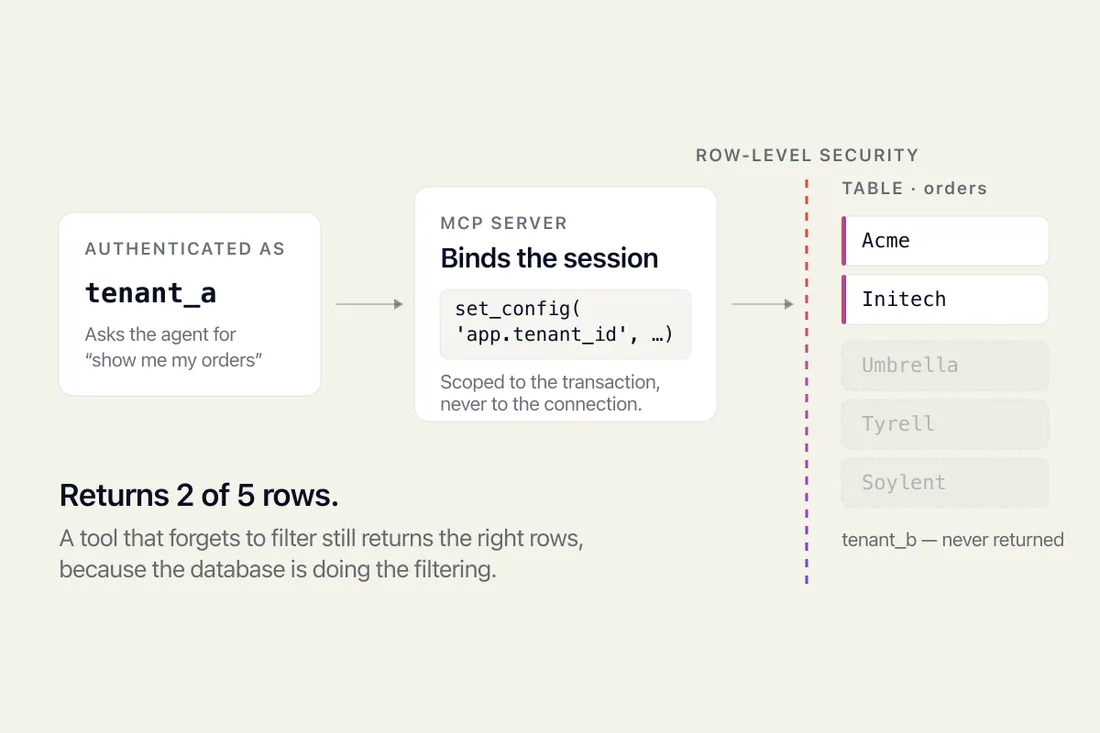
Give an AI agent your database and it sees every tenant's rows. How Postgres row-level security fixes that, and the two traps that silently disable it.

 Co-founder, PixlerLabJun 15, 2026

AI-Powered Software Development coding testing and system design is shaking things up in software creation. It’s not just about adding a new tool to the toolkit; it’s about a complete transformation in how we tackle software projects. At PixlerLab, we’ve seen this evolution firsthand, weaving AI into our workflow and turning hurdles into stepping stones. Seriously. This Blog post explores AI’s role across various software development stages, offering real-world examples and insights from our projects (and, trust us, we’ve learned a lot).
Traditional development techniques have their share of issues. The manual nature of coding and testing makes them labor-intensive and prone to errors-especially as software demands grow. These approaches struggle to keep up with the increasing complexity, rendering them less effective over time.
Imagine dealing with the usual bottlenecks: debugging massive codebases or conducting manual testing. These methods often miss hidden bugs that lead to project delays. Picture a huge enterprise app with regular updates. Each update means thorough testing, and honestly, traditional methods just can’t cut it. Debugging can become an endless loop of fixing one bug only to create another-a frustrating experience for any developer.
And it’s not just bugs. Scaling issues can plague traditional setups. As user bases grow, server loads increase, and without AI-driven insights, predicting and preparing for these changes is challenging. Developers are stuck putting out fires instead of innovating. We’ve faced this firsthand at PixlerLab-one misstep and you find yourself drowning in technical debt.
Modern software systems are, well, complex. They’re handling mountains of data and intricate user experiences while trying to keep pace with ever-evolving tech trends. That’s where AI steps in, lightening the load by automating mundane tasks and offering predictive insights. If you’re into system architecture, you’ll see how AI-driven automation is becoming a necessity. At PixlerLab, AI has helped us catch potential database issues and suggest tweaks, saving us headaches and time.
For API and third-party integrations, things can get dicey with more failure points and security risks. AI’s got that covered, though. It keeps an eye on API interactions, ensuring everything’s secure and compliant. AI even predicts how changes in one service could ripple through others, letting us make proactive tweaks.
“AI shines in proactive problem-solving, turning potential issues into opportunities for improvement.”
Concurrency issues in multi-threaded apps? AI shines there too. It dives into concurrent operations, finding deadlocks and suggesting tweaks to keep performance up. With AI on the lookout for immediate threats and the unforeseen complexities of the future, software development is entering a whole new era. It’s not only about coding; AI is reshaping how we design systems too. This shift is allowing architects to have predictive tools and insights at their fingertips. AI systems run simulations, predict outcomes, and enable architects to make quick, informed decisions.

Also, consider the vast landscape of microservices. With AI’s analytical capabilities, orchestrating these services becomes more simplify. AI dynamically monitors service health and automatically reroutes traffic in case of failure, dramatically reducing downtime. Our team implemented this in a recent project, and the results were impressive-downtime dropped by 60%, leading to satisfied clients and happier end-users.
AI makes significant contributions to system design by optimizing resource allocation. Take PixlerLab, for instance. We’ve seen AI optimizing our cloud architecture by forecasting resource allocation, making sure we’re running as smoothly as possible. Platforms like TensorFlow and IBM’s Watson offer ready-made models and excellent data handling. AI boosts system reliability by predicting potential failures and simulating component interactions to flag vulnerabilities before they become actual problems.
AI isn’t limited to mere optimizations. It actively contributes to the creative process. By analyzing user behavior patterns, AI suggests personalization features or changes in the user interface that can enhance user engagement. This level of insight was something we’d only dreamt of a few years back. Thanks to AI, our projects now include features we might never have considered.
Microsoft’s Azure Machine Learning is a versatile tool for embedding AI into system designs, offering tons of community support (which we appreciate when tackling tricky integration issues). It lets developers experiment with AI algorithms safely-not by trial and error on live systems. AWS and Google Cloud also lend their AI analytics tools, essential for spotting where AI can step in to improve things.
AI isn’t just about insights-it’s about action. It helps balance loads across servers by analyzing traffic and shifting server allocations in real time. This adaptability means users experience less lag and enjoy smoother interactions even when demand spikes. Our team once faced a severe traffic spike during a major product launch. AI-driven load management allowed us to handle the influx without a hitch, ensuring a smooth experience for users.
Looking to integrate AI into your coding process? It might seem daunting at first. But once you find your groove, it’s like having a co-pilot along for the ride. Start small, get comfortable, then scale up. Here’s how:
It’s all about getting comfortable with these tools in your day-to-day workflow to boost productivity without the disruption. Just last month, we experimented with AI-assisted tools to refactor an outdated codebase. What would have taken weeks boiled down to a few days, allowing us to focus on new features.
# Example of AI-assisted code snippet generation
def generate_summary(text):
 # AI model logic here
 summary = ai_model.summarize(text)
 return summary
Thanks to AI tools, those tasks that used to feel like a slog now feel more like a breeze. Developers have more room to focus on the creative side of things. For example, using AI for natural language processing tasks like text summarization simplifies workflows, delivering more consistent results. AI doesn’t just save time-it enhances creativity by allowing more time for ideation and experimentation.
from transformers import pipeline

# Initialize the AI summarizer
summarizer = pipeline("summarization")

# Example text
text = ("AI has transformed the software development process, "
 "making it more efficient and reliable.")

# Generate a summary
summary = summarizer(text, max_length=50, min_length=25, do_sample=False)

print(summary)
This example uses the Hugging Face Transformers library for text summarization, showing off how AI makes complex tasks manageable. The result? A concise summary from the text, demonstrating AI’s ability to handle heavy data work-freeing developers to strategize instead. The flexibility of these models allows them to be tailored for specific fields, making them invaluable where technical jargon abounds. It’s like having a specialist who gets your industry and tailors their advice just for you.
We’ve also applied similar models in different contexts. For a healthcare application, for instance, we customized a model patient records, streamlining the review process for healthcare professionals. This not only saved time but also ensured critical information was readily accessible, enhancing the decision-making process.
Picking the right tech stack is crucial for successful AI-Powered Software Development. Projects vary, but here’s a solid starting point:
AI development often leans on platforms like TensorFlow, PyTorch, and scikit-learn. TensorFlow scales well, PyTorch is great for dynamic prototyping, and scikit-learn is your go-to for traditional machine learning tasks. Each has its benefits, so choose based on what your project demands.
Setting up AI tools isn’t plug-and-play. You need to plan for data processing needs and keep pipelines efficient and up-to-date to cope with AI’s demands. Regularly refresh models, especially in fast-moving fields. At PixlerLab, we’ve a dedicated team to ensure that our AI models are continuously learning and adapting, reducing the risk of stale data affecting results.
Cloud services like AWS SageMaker and Google Cloud AI are great for scaling your solutions. They offer managed environments, taking the grunt work out of deploying, monitoring, and managing AI models so your team can focus on creativity. To figure out if AI’s pulling its weight, track metrics: did it shave time off development? Improve code quality? Boost user satisfaction? For instance, AI can cut QA time by 30%, giving teams room to enhance features.
But here’s a twist: your tech stack must be flexible. As tech changes, your stack should integrate new tools smooth, avoiding complete overhauls. This flexibility prevents tech debt and saves time down the road. We found ourselves in a similar situation when a new AI tool came to market that was better suited for our needs. Because of our flexible architecture, integration was smooth, allowing us to take advantage of the new capabilities immediately.
AI-driven insights can pinpoint bottlenecks, suggesting solutions that speed up timelines and boost product quality. Imagine machine learning predicting server overloads and suggesting fixes, improving uptime significantly. At PixlerLab, AI in testing has helped us deliver projects early and boost our reputation for excellence. Our bug rates have fallen by over 40%-a testament to AI’s power to transform processes.
We’ve also seen clients beam with satisfaction due to AI’s personalization features and solid applications. One retail client forecast shopping trends with AI for better stock management and marketing-resulting in higher sales and customer loyalty. AI turned out to be a big improvement. In another instance, a logistics company optimized delivery routes using AI. By assessing traffic patterns and delivery schedules, they cut fuel consumption by 15% and improved on-time deliveries by 20%. Numbers aside, these changes translate to real-world business improvements.

Consider the media industry. AI-powered recommendation engines have transformed content delivery, tailoring suggestions based on viewer habits and preferences. This personalization not only enhances user experience but also increases engagement, leading to longer viewing times and increased ad revenue.
Look, AI isn’t a magic bullet that solves everything. Here’s what to watch out for:
A big misstep is thinking AI can do it all. It’s amazing, sure, but it has limits. Set realistic goals for deployment, and remember: AI needs human oversight to stay relevant and accurate.
AI models depend heavily on their data. Biased data can lead to big mistakes. Developers need to aim for transparency in AI models, balancing the strengths of AI with human oversight. It’s vital because, while AI is great with data, humans bring creativity and empathy to the table.
We’ve encountered projects where AI’s role was misunderstood, leading to unrealistic expectations. To avoid this, we recommend conducting thorough feasibility studies and maintaining clear communication with stakeholders about what AI can and can’t do.
A hybrid approach, where AI tackles routine tasks, lets humans focus on creative thinking and strategy. This teamwork improves decision-making and ignites new solutions.
Not everything suits AI. It excels at pattern recognition and data crunching but struggles with abstract problems lacking clear data. Knowing when to deploy AI is crucial. When in doubt, consult with AI experts who can help guide the process and ensure that AI is used effectively.
And here’s the rub: while AI can crunch data like there’s no tomorrow, it lacks the intuition that comes with human experience. This can lead to decisions that might be logically sound but miss the nuances of human interaction or cultural context. Balance is key-combining AI-driven insights with human gut instinct unlocks AI’s full potential in software development.
AI’s reach is wide, impacting industries and showcasing its potential in software development.
Finance leans on AI for fraud detection by tracking transaction patterns. In healthcare, AI helps diagnose diseases via image classification, kicking off early treatments. Automotive? AI is all about autonomous driving systems, processing sensory data to make those crucial split-second decisions.
These examples highlight AI’s precision in specialized tasks. From logistics to marketing, AI’s applications are vast. In tech, AI-powered bots are freeing up human agents by tackling customer service queries. Manufacturing uses AI for production line tweaks, cutting waste and boosting efficiency. Sound familiar? The future for AI in software development lies in predictive analytics and autonomous systems. As machine learning models evolve, their role in real-time decision-making will grow. Businesses will increasingly lean on AI for strategic insights, heralding a new era in business intelligence.
Explainable AI (XAI) is gaining ground, promoting transparency. As regulators watch for ethical AI, developers need to focus on XAI to keep trust high. Plus, AI’s integration with emerging tech like blockchain and IoT is set to open new avenues for security, data integrity, and device communications.
We anticipate AI enhancing human-computer interaction, making interfaces more intuitive and natural. Voice-enabled systems and conversational interfaces are just the beginning. Imagine an office where AI automatically adjusts settings based on your mood or schedule, enhancing productivity and comfort.
AI improves coding by offering real-time suggestions, automating tasks, and generating code snippets from descriptions. It speeds up development and reduces errors, allowing developers to focus on creative tasks. AI automates repetitive testing tasks and uses predictive analytics to find bugs and errors before they become issues. By continuously learning from past tests, AI provides more accurate assessments over time, enhancing the software testing process’s reliability and effectiveness.
No, AI can’t replace developers. Though it automates many tasks, AI can’t replicate the creativity, critical thinking, and nuanced decision-making that human developers provide.
AI’s main limitations include dependence on high-quality, unbiased data and substantial computational resources. It struggles with creative, abstract tasks without clear data patterns. AI systems require ongoing maintenance and human oversight to ensure they align with business goals and ethical standards.
Tools like TensorFlow and PyTorch are top picks for AI system design, supporting neural networks and offering extensive community resources for both prototyping and production-scale applications.
AI is revolutionizing software development, boosting efficiency, accuracy, and speed. As we weave these technologies into our processes, the future of AI-powered development looks bright. At PixlerLab, using AI tools smooths the development journey, sparking innovation and delivering better outcomes for developers and users alike.
Curious about bringing AI into your software development routine? PixlerLab offers tailor-made AI solutions to fit your needs. Whether it’s supercharging productivity with AI-powered tools or refining system design, we’re here to help. Explore PixlerLab’s AI solutions and step into the future of development today.
Give an AI agent your database and it sees every tenant's rows. How Postgres row-level security fixes that, and the two traps that silently disable it.

MCP is a protocol for connecting AI to your tools. MVP is the smallest product worth shipping. What each means and which you need.

Model Context Protocol : what it replaces, how it speeds AI MVPs, & production-ready integrations today.