
AI SaaS MVP checklist: 12 decisions from model choice to cost ceilings & evals that determine your launch timeline.

 Co-founder, PixlerLabApr 16, 2026

When it comes to ai powered tools for software development, getting the fundamentals right matters. Picture this: AI-powered tools that shave hours off your workweek by handling those tedious parts of software development. At PixlerLab, we’ve seen these tools transform projects from mere ideas to full-fledged realities faster than you’d expect. They don’t just automate the boring stuff; they lift code quality and smooth out the development process. With the squeeze on for faster and more dependable software solutions, AI is pretty much the secret weapon developers everywhere are reaching for.
Why does this matter? Remember those late nights spent battling bugs or rushing to meet deadlines? AI tools tackle these headaches by streamlining tasks, allowing developers to concentrate on the fun stuff-innovating. It’s less about tech upgrades and more about reimagining what’s achievable in software development. With AI, those long debugging sessions become much shorter, and the risk of human error is significantly reduced.
Over the past decade, AI has completely flipped software development on its head. Tasks like debugging and testing, which once were manual and painstaking, are now automated through predictive coding and smart debugging. This technological shift frees developers to tackle more creative challenges. It’s not just speeding things up-it’s about unleashing new waves of creativity. AI isn’t solely about speed. It’s also about quality. Take generative AI models like GPT-3, which can suggest whole code blocks, making development both faster and more intuitive. And this isn’t just the big guys like Microsoft and Google jumping on board; startups are diving in, eyeing the competitive advantage these tools provide.
The integration of AI in software development processes wasn’t an overnight change. It started with simple automation scripts and has grown into complex AI systems. These systems not only automate repetitive tasks but also offer advanced analytics and predictive capabilities. This shift allows teams to focus on creative solutions instead of getting bogged down by mundane issues. AI tools also adapt over time, using machine learning to improve their recommendations and efficiency the more they’re used.
“AI isn’t going to replace developers; it’s going to change what developers do.” — Paul Daugherty, Chief Technology & Innovation Officer at Accenture.
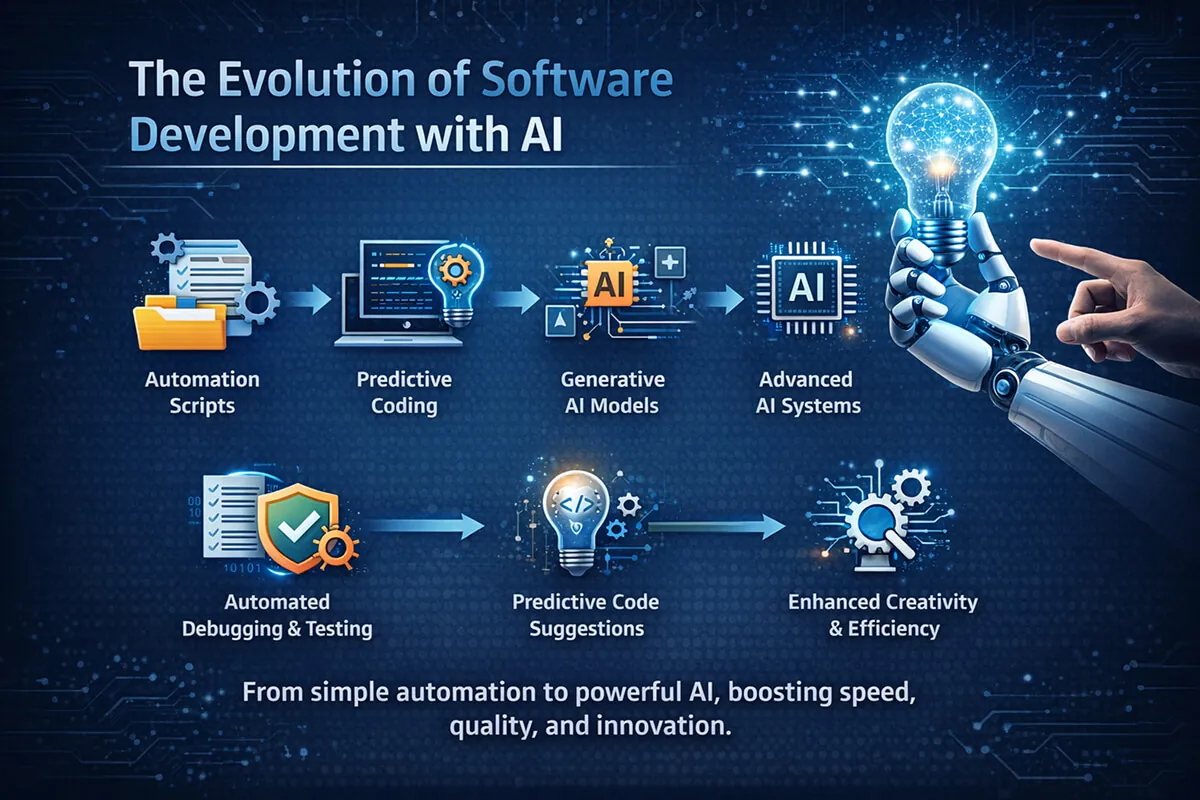
Software development is much more than just writing code. It’s a complex mix of debugging, testing, and deploying, often slowed by human error. With software now deeply woven into everyday life, efficient, accurate processes are more crucial than ever. Does it seem like debugging and testing are devouring your time? AI-powered tools can step in. They automate code reviews and testing, slashing time and reducing errors. Automated testing, for instance, catches bugs more quickly than traditional methods, leading to faster fixes and fewer bugs slipping into production.
Even beyond code and testing, AI helps in project management and resource allocation. It can predict potential bottlenecks before they become problems. So, why does this matter? Because it liberates developers from mundane chores, allowing them to engage with more complex problem-solving and innovation. Plus, with AI’s ability to learn from data, these tools only get better over time, continuously refining their processes for maximum efficiency.
Consider continuous integration/continuous deployment (CI/CD) pipelines. Manual testing can really slow these down, stalling releases. AI tools automate these tests for rapid, reliable deployments. Think of them as an untiring extra set of eyes that always spot the little things. The success of AI-powered tools in software development depends a lot on their architecture. They’re designed for scalability and flexibility, ready to shift as project needs evolve. This is a huge boon in agile environments where demands are constantly changing.
Also, AI helps with code standardization. It ensures that code follows the necessary guidelines, reducing the likelihood of errors and improving the maintainability of the project. With AI keeping an eye on standards, developers can focus more on solving the complex problems that matter. But there’s more. AI tools also help identify redundant processes, suggesting optimizations that can save both time and resources.
AI tools fit smoothly into CI/CD pipelines, providing continuous monitoring and automated updates that enhance software architecture. This creates a simplified workflow that boosts productivity without cutting corners. For example, an AI-driven testing module can automatically conduct regression tests each time new code is pushed, catching bugs early. And these tools play nicely with existing systems. They integrate with widely used version control systems like Git, so you don’t need to overhaul your setup to enjoy the perks of AI. This makes transitioning smoother and less jarring.
The architecture of AI tools is critical for their successful integration and functionality. These tools are designed with modularity in mind, allowing them to be customized and scaled according to the needs of a specific project. At PixlerLab, we’ve found that modular AI solutions are particularly beneficial in agile environments where project requirements frequently change. This adaptability means AI tools can provide ongoing support, regardless of the project’s size or complexity.
Diving into AI tools might initially feel daunting, but breaking it down into steps makes it manageable. Here’s a simple guide to weaving AI-powered tools into your workflow.
Time to dive into some code examples to see AI-powered tools in action. These snippets illustrate how AI can simplify routine coding tasks.
# Example: AI-powered code completion using GPT-3
import openai

openai.api_key = 'your-api-key'

def complete_code(prompt):
 response = openai.Completion.create(
 engine="davinci-codex",
 prompt=prompt,
 max_tokens=150
 )
 return response.choices[0].text.strip()

# Provide a code snippet and get AI-generated completion
prompt = "def calculate_sum(a, b):"
print(complete_code(prompt))
This snippet illustrates how GPT-3 can manage code completion. Just give it a function signature, and it’ll suggest a potential implementation. This feature saves developers time and helps them stick to best practices without endless digging or trial and error. In practical use, this can mean less coder’s block and more efficient project timelines. And let’s be honest: it’s pretty satisfying to see code appear like magic.
The tech stack behind AI Development tools is a powerhouse of diverse frameworks and languages. Understanding this stack is crucial for effective implementation and maximizing potential.
Common technologies include machine learning frameworks like TensorFlow and PyTorch, which offer solid environments for AI model development. For natural language processing, frameworks like spaCy and NLTK are often used. These tools are chosen for their ability to meet specific project needs and integrate smoothly with existing setups.
But why pick one over another? TensorFlow is renowned for its scalability, ideal for large-scale applications. PyTorch, on the other hand, is celebrated for its user-friendly interface, making it a favorite for R&D. By weighing the strengths of each technology, developers can make smart choices that align with their project goals. Our team often opts for PyTorch in experimental projects due to its flexibility and straightforward debugging process.

AI tools can really speed up development, but measuring that impact is essential. Real-world metrics provide valuable insights into the gains achieved through AI integration.
AI tools’ performance is assessed with metrics like latency, accuracy, and throughput. For instance, AI-driven testing tools can reduce testing time by 30% or more. But it’s not just numbers that matter. It’s about the improved user experience, fewer bugs in production, and the peace of mind developers get knowing AI is watching their backs.
Tracking these metrics over time enables developers to gauge the long-term benefits of AI tools. By analyzing data, developers can pinpoint where AI shines and where more optimization is needed. At PixlerLab, continuous monitoring and tweaking have led to consistent performance improvements. For example, an AI model trained on specific codebases can significantly cut down error rates by suggesting viable code corrections as problems are detected.
Jumping into AI tools isn’t always easy. Many developers fall into the trap of over-relying on AI without enough oversight, leading to unexpected problems.
One common blunder? Failing to integrate AI tools effectively into the broader development process. AI should supplement human efforts, not replace them. Developers need a careful balance of AI automation with manual checks to maintain quality. This is crucial for achieving a harmonious mix of efficiency and quality.
Another pitfall is ignoring data quality. AI models rely on high-quality data for best performance. Poor data can drag down model efficiency, negating the benefits of AI tools. Ensuring data used in AI models is accurate, relevant, and up-to-date is vital for successful AI integration. Also, underestimating the learning curve for these tools can lead to frustration and underperformance. A structured training plan can alleviate this issue significantly.
AI tools aren’t just theoretical; they’re in action at leading tech companies, showcasing real-world applications and benefits.
Check out Google. They use AI for automated bug fixing, saving tons of time and resources. Imagine a developer no longer needing to trawl through code to find a bug-AI does it for them. Over at Facebook, they’ve integrated AI into software lifecycle management, streamlining their processes.
Spotify employs AI for personalized user experiences. Their recommendation algorithms are powered by complex AI models that adapt to user behavior in real-time. And then there’s Netflix, using AI to boost content delivery and optimize streaming quality for millions. These cases highlight the benefits of integrating AI into the software lifecycle. At PixlerLab, we’ve experimented with similar AI solutions in media streaming, and the results have been impressive in terms of user engagement and retention.
AI-powered tools for software development use artificial intelligence to automate and enhance various aspects of software creation, like coding, testing, and project management. They help developers produce higher-quality software more efficiently.
AI tools improve efficiency by automating repetitive tasks, providing intelligent debugging, and offering predictive coding. By reducing the manual workload, developers can focus on complex problem-solving, speeding up the overall development process. No, AI can’t replace human developers. While AI can automate certain tasks, creative problem-solving and critical thinking remain human strengths. AI tools are designed to assist developers, not replace them.
Popular AI tools in coding include GitHub Copilot for code completion, DeepCode for automated code reviews, and Snyk for security testing. These tools simplify various coding tasks and improve software quality. Integrating AI tools involves evaluating your workflow needs, selecting appropriate tools, and gradually implementing them into your processes. Training your team and monitoring the tools’ performance are crucial steps for successful integration.
AI-powered tools in software development offer huge advantages in efficiency and productivity. While there are challenges in fully integrating these tools, the potential benefits far outweigh the obstacles. At PixlerLab, we’re big fans of using AI to simplify development processes, and we see a bright future for AI in software development.
Discover how PixlerLab can transform your development process with AI. We offer a range of AI solutions tailored to enhance your Software Development Lifecycle. Contact us today for a free consultation and explore the possibilities with PixlerLab’s expertise!
AI SaaS MVP checklist: 12 decisions from model choice to cost ceilings & evals that determine your launch timeline.
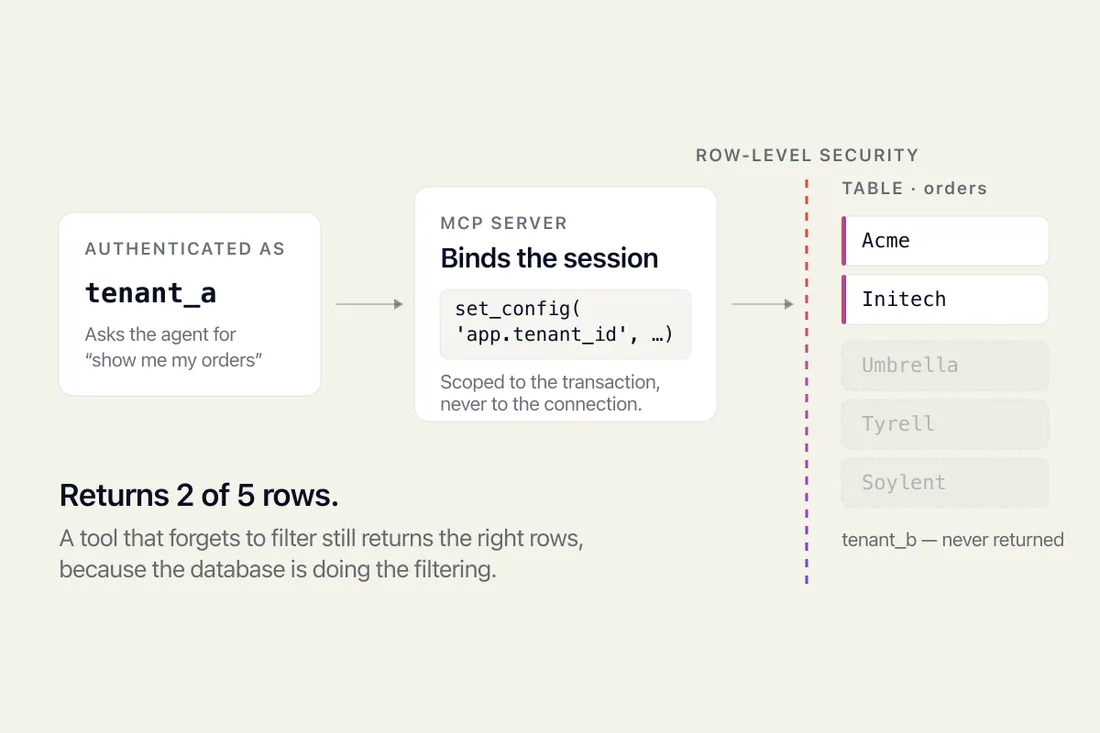
Give an AI agent your database and it sees every tenant's rows. How Postgres row-level security fixes that, and the two traps that silently disable it.

MCP is a protocol for connecting AI to your tools. MVP is the smallest product worth shipping. What each means and which you need.